Learn how to implement a user feedback manager in your app using toast messages and vue-sonner. We'll integrate our flash message manager with state provided from AdonisJS' flash messages store to display success and error messages.
Toast messages are a fantastic way to provide users with quick feedback without disrupting their workflow. This tutorial shows you how to integrate them into your application using Shadcn-Vue and Vue-Sonner.
What are Toast Messages?
Think of them as little pop-up notifications that briefly appear in a corner of the screen, informing the user about an action. They're non-intrusive and disappear automatically after a short time.
Getting Started: Installation and Setup
Install the necessary packages: You’ll need Shadcn-Vue and Vue Sonner. Use your package manager (like npm or yarn) to add them to your project. Vue-Sonner is a dependency of Shadcn-Vue Sonar.
Create a Toast Manager component: This component will handle the display logic for your toast messages. Import toast from vue-sonner and use its methods (toast.error, toast.success, etc.) to display different types of messages. The Shadcn-Vue Sonner component handles the visual presentation. We'll add the class="pointer-events-auto" to the Sonar component as recommended in the documentation to avoid conflicts with dialogs. Using the rich-colors flag will add color coding (green for success, red for error, etc.).
Integrate with AdonisJS: When a server-side action completes, we can send a flash message with appropriate keys (e.g., 'success', 'error') and messages using the HttpContext's session.
Pass messages to the frontend: In your Inertia config, add a section to include all flash messages, similar to how errors are handled except calling all rather than fetching a single key. This makes the messages available in your frontend Vue pages and layouts.
Add the Toast Manager to your layouts: Include the ToastManager component in your application's layouts (e.g., app.vue, auth.vue) and pass the messages in as a prop to the ToastManager.
Handle messages in the Toast Manager: Use a watchEffect (or similar reactive mechanism) in your ToastManager component to monitor your flash messages for changes. When messages change, display them using the appropriate toast methods from Vue-Sonner. You can create a helper function to normalize the different types of flash messages your application might send.
Advanced Techniques: Handling Exceptions and Validation Errors
The tutorial also demonstrates handling exceptions thrown during validation or other processes. This allows for displaying more informative error messages, combined with the validation errors already present in your forms.
By following these steps, you’ll successfully add clear and user-friendly feedback mechanisms to your applications using Toast messages—enhancing the overall user experience!
Hey, since vue-sonner updated to V2 we just need to add import 'vue-sonner/style.css' in the toast manager component if anyone has an issue with that :)
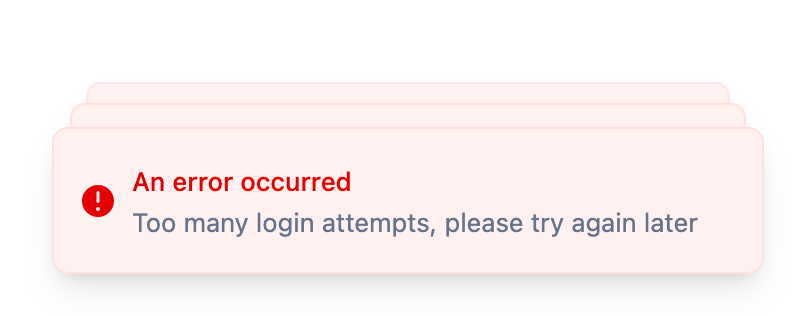
Hello Tom, is it possible to display the same toast multiple time ? Let say you fail auth, it will only appear once even if we submit multiple failed login forms
Hi memsbdm! With how we have it, it should display the toast for every failed login attempt. Vue Sonner stacks the messages by default, but you can see each individually if you hover over the stack.
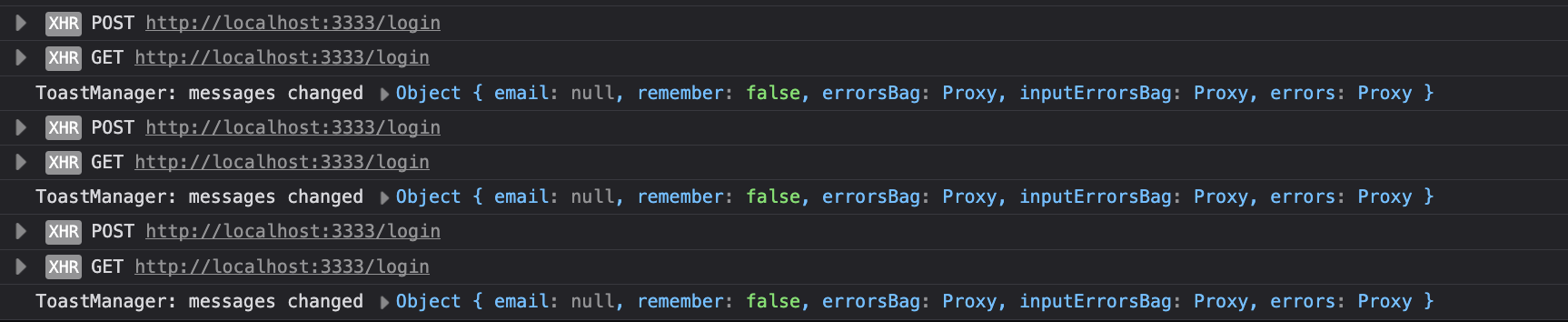
The key premise of it is that we're watching the effect of our messages prop. When the prop's proxy detects a mutation, our watchEffect is called, which pushes a new toast into Vue Sonner.
Try adding a console log within the watchEffect so you can see exactly when it is firing and the message(s) the mutation contains.
Hello, Sorry if you covered this point in another lesson, but:
Once the POST /register route is fully implemented, should session.flash('success', …) work?
In my case, it doesn't. When I console.log the shared data for the messages field in config/inertia.ts, it’s empty.
On the other hand, the session.flash in the POST /login route is working as expected.
Can you tell me if it should work and if I just have a bug in my codebase? If this is expected behavior, could you give me some hints to understand the use case?
And thanks for the awesome work. All these lessons have finally convinced me to learn AdonisJS!
Yeah, the toast system should be fully working by the end of this lesson. And, in fact, In lesson 5.2 Logging Out Users, we add in a session.flash('success' Welcome to PlotMyCourse') after successfully registering the user.
Are you redirecting the user after registering them? Flash messages are made available for the next request and won't be applied to the current, so the redirect does serve a purpose here.
Here is the final RegisterController's Store method.
@inject()async store({ request, response, session }: HttpContext, webRegister: WebRegister) { const data = await request.validateUsing(registerValidator) // register the user await webRegister.handle({ data }) session.flash('success', 'Welcome to PlotMyCourse') return response.redirect().toRoute('organizations.create')}
Copied!
If you'd like & are able, feel free to share a link to the repo and I can see if anything stands out.
Also, that's awesome to hear! I hope you enjoy AdonisJS and thank you for joining Adocasts Plus!! 😁
Thanks to your reply, I understand why it wasn't working. In register.store, I was redirecting to 'home', but I have middleware that redirects to the 'family.show' route when a user connects for the first time to "jail" him until he fill in the minimal required information.
Anytime! Awesome, I'm happy to hear you were able to track it down and get it all fixed up! 😊 Another alternative, if applicable to your use-case, is to reflash any messages. This will push the flash messages forward with a secondary redirection.
Flash → redirect home → reflash & redirect family.show
How do you handle re-rendering? If you put toast-manager into component tree which will change (i.e. due to navigation), toasts will flash and disappear. How to put it into persistent component tree (i.e. above the page component)?
Hi Pavlo! In Inertia, the built-in layout layer is positioned above the page component. This means that the instance of the layout component persists across page changes, as long as the page is linked to using Inertia’s Link component.
Since we're using the built-in layout layer in Inertia & our ToastManager lives within our AppLayout and AuthLayout, we're achieving exactly that. The only exception would be if we switch between those layouts - in which case you could use nested layouts to resolve that if needed.
Yeah. In my app I wasn't using persisting layouts and was just wrapping my pages into layout components, so this is where problem was. Checked your code and switched to persistent layouts - so far so good. Thanks for the course and prompt reply!
p.s. by any chance you have a course on integrating tansatck table (or something similar) with backend pagination, sorting and filtering?
Awesome, happy to hear you were able to get it working! Anytime!
I have a few lessons on pagination (linked below), but nothing to that extent at present, unfortunately. I debated on whether to include a table with pagination, sorting, and filtering in this series but opted against it due to the series already being lengthy. I'm thinking I might do that as an aside series though.
I'm having issues with messages between layouts (I guess). For example, when I logout I cannot see the message I'm puting with ctx.session.flash on my AuthController.
async logout({ auth, response, session }: HttpContext) {
    await auth.use('web').logout();

    session.flash('success', 'You have been logged out');

    return response.redirect().toRoute('login.show');
  }


      Copied!
I'm seeing that the messages are being received on the ToastManager.vue because of some debug I made with console.log. The only solution I found for now is to wrap the runToasts inside a nextTick but I'm not really sure
Do you also have the runToasts call within the onMounted hook? Since the ToastsManager is added via the layout, when you go from a page using the AppLayout to a page using the AuthLayout the AppLayout's ToastManager will be destroyed and a new one will be created and mounted for the AuthLayout. By having runToasts called inside the onMounted hook, we're populating that initial state for our messages when the component is first created and ready.
With how we have our layouts defined when we traverse between pages using the same layout, like going from the login page to the register page, the same layout instance will be used. Since our ToastsManager is added via the layout, that also means the same ToastManager instance will be used and that is where the watchEffect comes into play. That will watch the reactive values we're using within the hook for changes and rerun when any are detected.
Why does it work when wrapped in $nextTick? The issue is that watchEffect runs immediately to pickup which reactive values to watch for changes. When it runs immediately, its running in the setup stage of our component at which time the component hasn't been mounted, so we don't have a template yet. That results in nothing happening with our toasts. By wrapping it in $nextTick you're deferring when the watchEffect's runToasts call actually run.