Ready to get started?
Join Adocasts Plus for $8/mo, or sign into an existing Adocasts Plus account, to get access to all of our lessons.

Building with AdonisJS & Inertia #8.0
Querying & Listing An Organization's Courses
We'll query the active organization's courses and list them out in a table.

- Created by
- @tomgobich
- Published
Join the Discussion 5 comments
-
It looks like shadcn updated recently to use Reka instead of Radix. I tried following the upgrade instructions at https://www.shadcn-vue.com/docs/changelog#update-your-project, by adding
"ui": "~/components/ui", "lib": "~/lib", "composables": "~/composables"Copied!to the components.json file, and then trying to reinstall the components, but I still get the same message as before:
An invalid components.json file was found at /plotmycourse.
Before you can add components, you must create a valid components.json file by running the init command.
Learn more at https://shadcn-vue.com/docs/components-json.
Should I just delete the components.json file and run the init? Or what is the best route forward for continuity with the course?
1-
Responding to aaron-ford
I found npx shadcn-vue@0.11.4 add table, that seems to install it, though it does give a bunch of warnings:
npm WARN EBADENGINE Unsupported engine {
npm WARN EBADENGINE package: 'undici@7.4.0',
npm WARN EBADENGINE required: { node: '>=20.18.1' },
npm WARN EBADENGINE current: { node: 'v20.11.0', npm: '10.5.1' }
npm WARN EBADENGINE }
npm WARN deprecated inflight@1.0.6: This module is not supported, and leaks memory. Do not use it. Check out lru-cache if you want a good and tested way to coalesce async requests by a key value, which is much more comprehensive and powerful.
npm WARN deprecated source-map-resolve@0.6.0: See https://github.com/lydell/source-map-resolve#deprecated
npm WARN deprecated glob@7.2.3: Glob versions prior to v9 are no longer supported
I'll try and continue with this, but if there's a better way, please let me know. Thanks!
0 -
Responding to aaron-ford
Yep! I'm working on updating lesson 1.4 of this series this weekend just for this, though in the updated lesson, I'll recommend sticking with Radix for the time being. Getting their Reka update working is too much of a change, and there may be several inner-component changes as well that would confuse those following this series. You can still access the documentation for the Radix version at radix.chadcn-vue.com. You can also target it via their CLI via:
npx shadcn-vue@radix <command>Copied!I've tried getting their Reka updating working myself, and tried re-initializing - neither work without compromise. They dropped support for specifying a
tsconfig.jsonlocation and will instead only check the project root for atsconfig.json,tsconfig.web.json, ortsconfig.app.jsonfile in that order. They have a preflight check on their CLI commands that will fail the command if the foundtsconfigis missing an alias definition, which is also why it states thecomponents.jsonfile is incorrect despite it matching their spec.So the only possible way to get their Reka UI update working would be to rename the AdonisJS
tsconfig.jsonfile in the root of the project to something else, as Shadcn-Vue's preflight command check will only ever find and use this tsconfig file due to its name and priority in their search.You'd then need to move your Inertia
tsconfig.jsonfile out into the project root.I haven't tried, but you may have luck getting things working if you move all the Shadcn-Vue stuff into the
inertiafolder.0-
Responding to tomgobich
Thanks. Just a note, I tried npx shadcn-vue@radix add table and it failed with an error 'Failed to fetch base color from registry.' I had to run it with a version (npx shadcn-vue@0.11.4 add table) to get it to install, despite the many warnings.
1-
Responding to aaron-ford
Looks like
npx shadcn-vue@radixis targeting 0.11.4, just as an alias, so those should behave the same. It's possible there was a network issue - their add commands send API requests out to the actual ShadCN site to get configurations, like colors. Based on this issue, you might also have an invalidbaseColorin yourcomponents.json.Here's my attempt to run it and you can see it prompted me to install v0.11.4
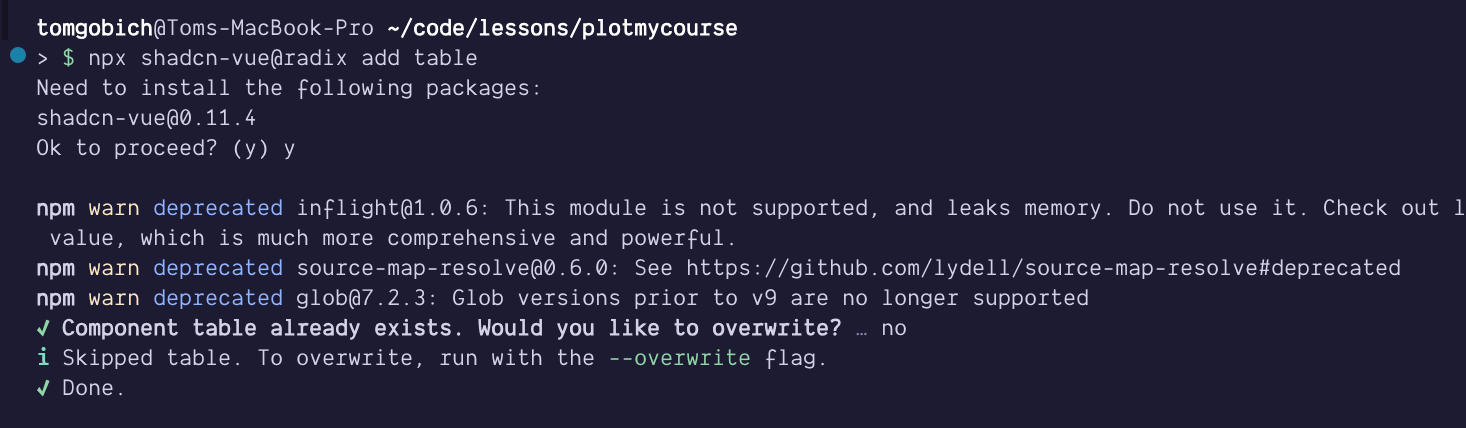
The unsupported engine warning you got is stating that the package
undicirequires NodeJS v20.18.1 or higher, but you have v20.11.0 installed. So, that'll go away if you update your NodeJS version, not entirely sure what makes use ofundici.0
-
-
-