So now there's one last nugget of information that we should cover about props, and that's a utility that EdgeJS comes with called SerializeExcept and SerializeOnly. These utilities allow us to set and serialize props as direct attributes on elements.
Let's take a closer look at how they work.
Attribute Serialization
Within our app layout, let's say we have our main content wrapped in a <main> element, and we want to transfer all the props to this element's attributes, except for the "title" prop. Thanks to these utilities, we can easily achieve this by…
Inside the component's template, use double curly braces to access the
$propsobject.Then, use the
$props.serializeExcept(['title'])directive to specify which prop to exclude from serialization, in this case, "title."
<div class="max-w-4xl mx-auto my-8"> <header class="bg-gray-100 p-6 -mx-6 mb-6 rounded-md"> @if (title != 'Home') <a href="/" class="text-xs">Home</a> @endif <h1 class="text-2xl font-bold">{{ titleCase(title) }}</h1> </header> <main {{ $props.serializeExcept(['title']) }}> <main> {{{ await $slots.main() }}} </main> </div>Copied!
- resources
- views
- components
- layout
- app.edge
After making these changes and saving, you'll see that everything except the "title" prop will be rendered as valid attributes directly on the <main> element.
For example, let’s add a prop onto our layout from our view setting the class to text-red-500, which will make our text red and make this change visually evident.
@layouts.app({ title: request.params().name, class: 'text-red-500', }) <h3 class="font-bold">Base Button</h3> <div class="mb-8 space-x-3 space-y-3"> Button goes here </div> @endCopied!
- resources
- views
- components
- button.edge
If you now inspect your final rendered DOM in the browser, you should see something to the effect of the below.
<div class="max-w-4xl mx-auto my-8"> <header class="bg-gray-100 p-6 -mx-6 mb-6 rounded-md"> <a href="/" class="text-xs">Home</a> <h1 class="text-2xl font-bold">{{ titleCase(title) }}</h1> </header> <main class="text-red-500"> <h3 class="font-bold">Base Button</h3> <div class="mb-8 space-x-3 space-y-3"> Button goes here </div> </main> </div>Copied!
Passing AlpineJS State
In addition to rendering traditional attributes using these utilities, we can also serialize state and event data for AlpineJS as well.
@layouts.app({ title: request.params().name, class: 'text-red-500', 'x-data': `{ text: 'hello' }`, '@click': `alert(text)` }) <h3 class="font-bold">Base Button</h3> <div class="mb-8 space-x-3 space-y-3"> Button goes here </div> @endCopied!
- resources
- views
- components
- button.edge
Now, when you click on the "Main content," it triggers the "alert" event with the message "hello" passed through via our AlpineJS state.
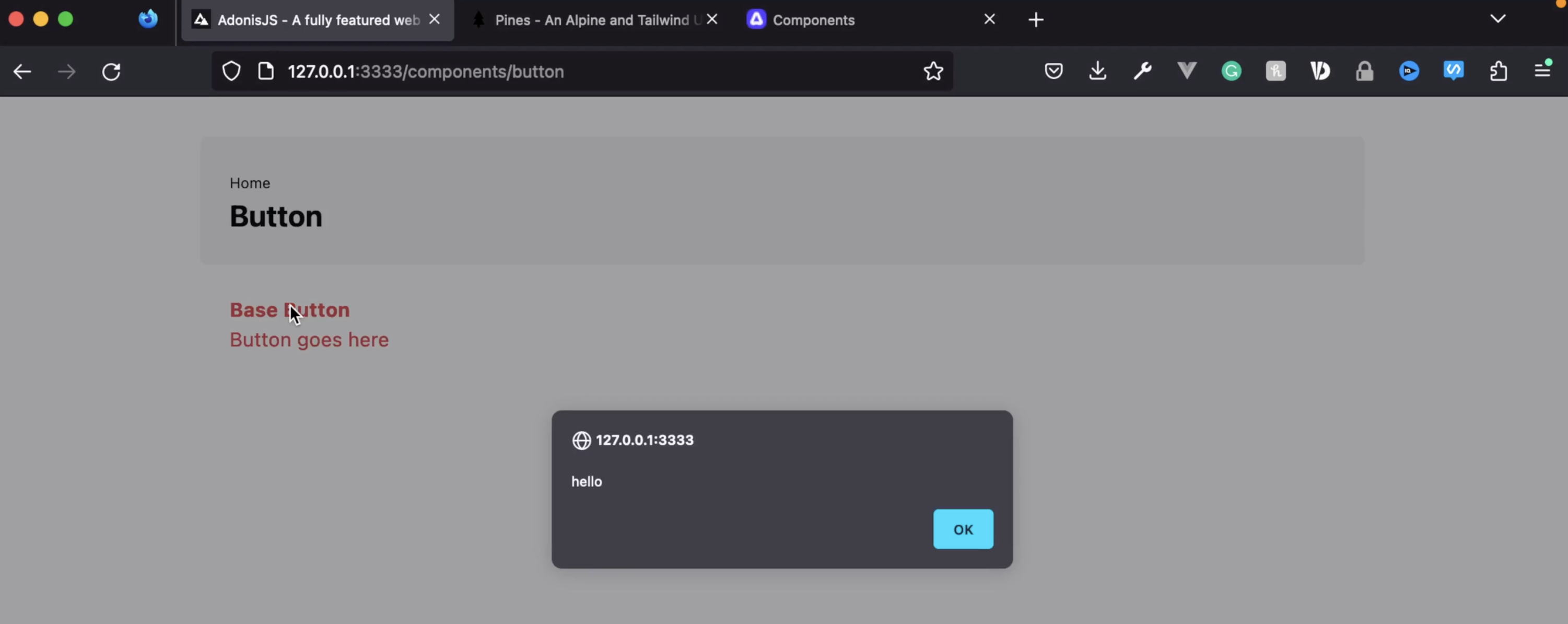
So that should give you an idea of just how much serializeOnly and serializeExcept is is going to come into play with adding reactivity to our components here in the future.